There is so much to tell about the Western country in that day that it is hard to know where to start. One thing sets off a hundred others. The problem is to decide which one to tell first.
—JOHN STEINBECK, East of Eden
Manual · Appenders · Appenders: Network and Mail
Appenders: Network and Mail
Logback Classic
While logging events are generic in logback-core, within
logback-classic they are always instances of
ILoggingEvent. Logback-classic is nothing more than a
specialized processing pipeline handling instances of
ILoggingEvent.
SocketAppender and SSLSocketAppender
The appenders covered thus far are only able to log to local
resources. In contrast, the
SocketAppender is designed to log to a remote
entity by transmitting serialized ILoggingEvent
instances over the wire. When using SocketAppender
logging events on the wire are sent in the clear. However, when
using
SSLSocketAppender, logging events are delivered
over a secure channel.
The actual type of the serialized event is LoggingEventVO
which implements the ILoggingEvent
interface. Nevertheless, remote logging is non-intrusive as far as
the logging event is concerned. On the receiving end after
deserialization, the event can be logged as if it were generated
locally. Multiple SocketAppender instances running on
different machines can direct their logging output to a central
log server whose format is fixed. SocketAppender
does not take an associated layout because it sends serialized
events to a remote server. SocketAppender operates
above the Transmission Control Protocol (TCP) layer which
provides a reliable, sequenced, flow-controlled end-to-end octet
stream. Consequently, if the remote server is reachable, then log
events will eventually arrive there. Otherwise, if the remote
server is down or unreachable, the logging events will simply be
dropped. If and when the server comes back up, then event
transmission will be resumed transparently. This transparent
reconnection is performed by a connector thread which periodically
attempts to connect to the server.
Logging events are automatically buffered by the native TCP implementation. This means that if the link to server is slow but still faster than the rate of event production by the client, the client will not be affected by the slow network connection. However, if the network connection is slower than the rate of event production, then the client can only progress at the network rate. In particular, in the extreme case where the network link to the server is down, the client will be eventually blocked. Alternatively, if the network link is up, but the server is down, the client will not be blocked, although the log events will be lost due to server unavailability.
Even if a SocketAppender is no longer attached to
any logger, it will not be garbage collected in the presence of a
connector thread. A connector thread exists only if the
connection to the server is down. To avoid this garbage
collection problem, you should close the
SocketAppender explicitly. Long-lived applications
which create/destroy many SocketAppender instances
should be aware of this garbage collection problem. Most other
applications can safely ignore it. If the JVM hosting the
SocketAppender exits before the
SocketAppender is closed, either explicitly or
subsequent to garbage collection, then there might be
untransmitted data in the pipe which may be lost. This is a common
problem on Windows based systems. To avoid lost data, it is
usually sufficient to close() the
SocketAppender either explicitly or by calling the
LoggerContext's stop() method before
exiting the application.
The remote server is identified by the remoteHost and port
properties. SocketAppender properties are listed in
the following table. SSLSocketAppender supports many
additional configuration properties, which are detailed in the
section entitled Using SSL.
| Property Name | Type | Description |
|---|---|---|
| includeCallerData | boolean |
The includeCallerData option takes a boolean value. If true, the caller data will be available to the remote host. By default no caller data is sent to the server. |
| port | int |
The port number of the remote server. |
| reconnectionDelay | Duration |
The reconnectionDelay option takes a duration string, such "10 seconds" representing the time to wait between each failed connection attempt to the server. The default value of this option is 30 seconds. Setting this option to zero turns off reconnection capability. Note that in case of successful connection to the server, there will be no connector thread present. |
| queueSize | int |
The queueSize property takes an integer (greater than zero) representing the number of logging events to retain for delivery to the remote receiver. When the queue size is one, event delivery to the remote receiver is synchronous. When the queue size is greater than one, new events are enqueued, assuming that there is space available in the queue. Using a queue length greater than one can improve performance by eliminating delays caused by transient network delays. See also the eventDelayLimit property. |
| eventDelayLimit | Duration |
The eventDelayLimit option takes a duration string, such "10 seconds". It represents the time to wait before dropping events in case the local queue is full, i.e. already contains queueSize events. This may occur if the remote host is persistently slow accepting events. The default value of this option is 100 milliseconds. |
| remoteHost | String |
The host name of the server. |
| ssl | SSLConfiguration |
Supported only for SSLSocketAppender, this
property provides the SSL configuration that will be used by
the appender, as described in Using SSL.
|
Logging Server Options
The logback classic distribution includes servers that can be
used to receive logging events from SocketAppender or
SSLSocketAppender.
SimpleSocketServer and its SSL-enabled counterpart
SimpleSSLSocketServer both offer an easy-to-use
standalone Java application that is designed to be configured and
run from your shell's command line interface. These applications
simply wait for logging events from SocketAppender or
SSLSocketAppender clients. Each received event is
logged according to local server policy. Usage examples are given
below.
Using SimpleSocketServer
The SimpleSocketServer application takes the following
command-line arguments: port, configFile, and one
or more allowedAddress values. Here port is the
port to listen on, configFile is a configuration script in
XML format, and each allowedAddress is a client IP address
or CIDR range that is permitted to connect (for example
192.168.1.10 or 192.168.1.0/24).
since 1.6.2 At least one allowed
address must be specified on the command line.
Assuming you are in the logback-examples/ directory,
start SimpleSocketServer with the following command:
java ch.qos.logback.classic.net.SimpleSocketServer 6000 \ src/main/java/chapters/appenders/socket/server1.xml \ 127.0.0.1 ::1
where 6000 is the port number to listen on,
server1.xml is a configuration script that adds a
ConsoleAppender and a
RollingFileAppender to the root logger, and
127.0.0.1 together with ::1 are the
client addresses allowed to connect (IPv4 and IPv6 loopback).
After you have started SimpleSocketServer, you can
send it log events from multiple clients using
SocketAppender, provided each client's remote address
matches an entry on the whitelist. The examples associated with
this manual include two such clients:
chapters.appenders.SocketClient1 and
chapters.appenders.SocketClient2 Both clients wait for the user
to type a line of text on the console. The text is encapsulated
in a logging event of level debug and then sent to the remote
server. The two clients differ in the configuration of the
SocketAppender. SocketClient1 configures
the appender programmatically while SocketClient2
requires a configuration file.
Assuming SimpleSocketServer is running on the
local host, you connect to it with the following command:
java chapters.appenders.socket.SocketClient1 localhost 6000
Each line that you type should appear on the console of the
SimpleSocketServer launched in the previous step. If
you stop and restart the SimpleSocketServer the
client will transparently reconnect to the new server instance,
although the events generated while disconnected will be simply
(and irrevocably) lost.
Unlike SocketClient1, the sample application
SocketClient2 does not configure logback by itself.
It requires a configuration file in XML format. The configuration
file client1.xml shown below creates a
SocketAppender and attaches it to the root logger.
Example: SocketAppender configuration (logback-examples/src/main/resources/chapters/appenders/socket/client1.xml)
<configuration>

  <appender name="SOCKET" class="ch.qos.logback.classic.net.SocketAppender">
    <remoteHost>${host}</remoteHost>
    <port>${port}</port>
    <reconnectionDelay>10000</reconnectionDelay>
    <includeCallerData>${includeCallerData}</includeCallerData>
  </appender>

  <root level="DEBUG">
    <appender-ref ref="SOCKET" />
  </root>

</configuration>
Requires a server call.
Requires a server call.
Note that in the above configuration scripts the values for the remoteHost, port and includeCallerData properties are not given directly but as substituted variable keys. The values for the variables can be specified as system properties:
java -Dhost=localhost -Dport=6000 -DincludeCallerData=false \ chapters.appenders.socket.SocketClient2 src/main/java/chapters/appenders/socket/client1.xml
This command should give similar results to the previous
SocketClient1 example.
Allow us to repeat for emphasis that serialization of logging
events is not intrusive. A deserialized event carries the same
information as any other logging event. It can be manipulated as
if it were generated locally; except that serialized logging
events by default do not include caller data. Here is an example
to illustrate the point. First, start
SimpleSocketServer with the following command:
java ch.qos.logback.classic.net.SimpleSocketServer 6000 \ src/main/java/chapters/appenders/socket/server2.xml \ 127.0.0.1 ::1
The configuration file server2.xml creates a
ConsoleAppender whose layout outputs the caller's file
name and line number along with other information. If you run
SocketClient2 with the configuration file
client1.xml as previously, you will notice that the output
on the server side will contain two question marks between
parentheses instead of the file name and the line number of the
caller:
2006-11-06 17:37:30,968 DEBUG [Thread-0] [?:?] chapters.appenders.socket.SocketClient2 - Hi
The outcome can be easily changed by instructing the
SocketAppender to include caller data by setting the
includeCallerData option to
true. Using the following command will do the trick:
java -Dhost=localhost -Dport=6000 -DincludeCallerData=true \ chapters.appenders.socket.SocketClient2 src/main/java/chapters/appenders/socket/client1.xml
As deserialized events can be handled in the same way as locally generated events, they even can be sent to a second server for further treatment. As an exercise, you may wish to set up two servers where the first server tunnels the events it receives from its clients to a second server.
Restricting client access
since 1.6.2
SimpleSocketServer accepts connections only from
clients whose remote address matches a configured whitelist. On
the command line, pass one or more allowed addresses after the
configuration file. Each entry may be a single IP address or a
CIDR network range. For example, the following command allows
connections from a single host and from an entire subnet:
java ch.qos.logback.classic.net.SimpleSocketServer 6000 \ src/main/java/chapters/appenders/socket/server1.xml \ 10.0.0.5 192.168.1.0/24
At least one allowed address is required on the command line.
If none is provided, the server prints a usage message and exits.
Connections from hosts that are not on the whitelist are closed
immediately after accept(), and a warning is logged.
When you embed SimpleSocketServer in your own
application, register allowed addresses before clients connect by
calling addAllowedClientAddress(String) for each
entry, or
setAllowedClientAddresses(Collection<String>)
to replace the full set. An empty whitelist means that no clients
are accepted. Passing an empty collection or null to
setAllowedClientAddresses clears the whitelist and
therefore denies all clients. Invalid specifications throw
IllegalArgumentException.
LoggerContext lc = (LoggerContext) LoggerFactory.getILoggerFactory(); SimpleSocketServer server = new SimpleSocketServer(lc, 6000); server.addAllowedClientAddress("10.0.0.5"); server.addAllowedClientAddress("192.168.1.0/24"); server.start();
The same whitelist rules apply to
SimpleSSLSocketServer, which inherits this behavior.
Using SimpleSSLSocketServer
The SimpleSSLSocketServer requires the same
port, configFile, and one or more
allowedAddress command-line arguments used by
SimpleSocketServer. Additionally, you must provide
the location and password for your logging server's X.509 credential
using system properties specified on the command line.
Assuming you are in the logback-examples/ directory,
start SimpleSSLSocketServer with the following command:
java -Djavax.net.ssl.keyStore=src/main/java/chapters/appenders/socket/ssl/keystore.jks \ -Djavax.net.ssl.keyStorePassword=changeit \ ch.qos.logback.classic.net.SimpleSSLSocketServer 6000 \ src/main/java/chapters/appenders/socket/ssl/server.xml \ 127.0.0.1 ::1
This example runs SimpleSSLSocketServer using an
X.509 credential that is suitable for testing and experimentation,
only. Before using SimpleSSLSocketServer in a
production setting you should obtain an appropriate X.509 credential
to identify your logging server. See
Using SSL for more details.
Because the server configuration has debug="true"
specified on the root element, you will see in the server's
startup logging the SSL configuration that will be used. This is
useful in validating that local security policies are properly
implemented.
With SimpleSSLSocketServer running, you can connect
to the server using an SSLSocketAppender. The following
example shows the appender configuration needed:
Example: SSLSocketAppender configuration (logback-examples/src/main/resources/chapters/appenders/socket/ssl/client.xml)
<configuration debug="true">

  <appender name="SOCKET" class="ch.qos.logback.classic.net.SSLSocketAppender">
    <remoteHost>${host}</remoteHost>
    <port>${port}</port>
    <reconnectionDelay>10000</reconnectionDelay>
    <ssl>
      <trustStore>
        <location>${truststore}</location>
        <password>${password}</password>
      </trustStore>
    </ssl>
  </appender>

  <root level="DEBUG">
    <appender-ref ref="SOCKET" />
  </root>

</configuration>
Requires a server call. Please wait a few seconds.
Requires a server call.
Note that, just as in the previous example, the values for
remoteHost, port are specified using substituted variable
keys. Additionally, note the presence of the ssl property and its nested trustStore property, which specifies the
location and password of a trust store using substituted
variables. This configuration is necessary because our example
server is using a self-signed certificate. See Using SSL for more information on SSL
configuration properties for SSLSocketAppender.
We can run a client application using this configuration by specifying the substitution variable values on the command line as system properties:
java -Dhost=localhost -Dport=6000 \ -Dtruststore=file:src/main/java/chapters/appenders/socket/ssl/truststore.jks \ -Dpassword=changeit \ chapters.appenders.socket.SocketClient2 src/main/java/chapters/appenders/socket/ssl/client.xml
As in the previous examples, you can type in a message when prompted by the client application, and the message will be delivered to the logging server (now over a secure channel) where it will be displayed on the console.
Note that the truststore property given on the command line specifies a file URL that identifies the location of the trust store. You may also use a classpath URL as described in Using SSL.
As we saw previously at server startup, because the client
configuration has debug="true" specified on the root
element, the client's startup logging includes the details of the
SSL configuration as aid to auditing local policy conformance.
SMTPAppender
The SMTPAppender
accumulates logging events in one or more fixed-size buffers and
sends the contents of the appropriate buffer in an email after a
user-specified event occurs. SMTP email transmission (sending) is
performed asynchronously. By default, the email transmission is
triggered by a logging event of level ERROR. Moreover, by default,
a single buffer is used for all events.
The various properties for SMTPAppender are
summarized in the following table.
| Property Name | Type | Description |
|---|---|---|
| smtpHost | String |
The host name of the SMTP server. Defaults to "localhost"
in com.sun.mail.smtp.SMTPTransport if not set. |
| smtpPort | int |
The port where the SMTP server is listening. Defaults to 25. |
| to | String |
The email address of the recipient as a
pattern. The pattern is evaluated anew with the
triggering event as input for each outgoing email. Multiple
recipients can be specified by separating the destination
addresses with commas. Alternatively, multiple recipients can
also be specified by using multiple <to>
elements.
|
| from | String |
The originator of the email messages sent by
SMTPAppender in the usual email
address format. If you wish to include the sender's name,
then use the format
"Adam Smith <smith@moral.org>" so that
the message appears as originating from
"Adam Smith <smith@moral.org>".
|
| subject | String |
The subject of the email. It can be any value accepted as a valid conversion pattern by PatternLayout. Layouts will be discussed in the next chapter. The outgoing email message will have a subject line corresponding to applying the pattern on the logging event that triggered the email message. Assuming the subject option is set to "Log: %logger - %msg" and the triggering event's logger is named "com.foo.Bar", and contains the message "Hello world", then the outgoing email will have the subject line "Log: com.foo.Bar - Hello World". By default, this option is set to "%logger{20} - %m". |
| discriminator | Discriminator |
With the help of a Discriminator,
By specifying a discriminator other than the default one, it is possible to receive email messages containing an events pertaining to a particular user, user session or client IP address. |
| evaluator | IEvaluator |
This option is declared by creating a new
In the absence of this option, Logback ships with several other evaluators, namely |
| cyclicBufferTracker | CyclicBufferTracker
|
As the name indicates, an instance of the
If you don't specify a cyclicBufferTracker, an instance of CyclicBufferTracker will be automatically created. By default, this instance will keep events in a cyclic buffer of size 256. You may change the size with the help of the bufferSize option (see below). |
| username | String | The username value to use during plain user/password authentication. By default, this parameter is null. |
| password | String |
The password value to use for plain user/password authentication. By default, this parameter is null. |
| STARTTLS | boolean |
If this parameter is set to true, then this appender will issue the STARTTLS command (if the server supports it) causing the connection to switch to SSL. Note that the connection is initially non-encrypted. By default, this parameter is set to false. |
| SSL | boolean | If this parameter is set to true, then this appender will open an SSL connection to the server. By default, this parameter is set to false. |
| charsetEncoding | String |
The outgoing email message will be encoded in the designated charset. The default charset encoding is "UTF-8" which works well for most purposes. |
| localhost | String |
In case the hostname of the SMTP client is not properly configured, e.g. if the client hostname is not fully qualified, certain SMTP servers may reject the HELO/EHLO commands sent by the client. To overcome this issue, you may set the value of the localhost property to the fully qualified name of the client host. See also the "mail.smtp.localhost" property in the documentation for the com.sun.mail.smtp package. |
| asynchronousSending | boolean |
This property determines whether email transmission is
done asynchronously or not. By default, the asynchronousSending property is
'true'. However, under certain circumstances asynchronous
sending may be inappropriate. For example if your application
uses SMTPAppender to send alerts in response to a
fatal error, and then exits, the relevant thread may not have
the time to send the alert email. In this case, set asynchronousSending property to 'false'
for synchronous email transmission.
|
| includeCallerData | boolean |
By default, includeCallerData is
set to false. You should set includeCallerData to true if
asynchronousSending is enabled and
you wish to include caller data in the logs. |
| sessionViaJNDI | boolean |
SMTPAppender relies on
javax.mail.Session to send out email messages. By
default, sessionViaJNDI is set to
false so the javax.mail.Session
instance is built by SMTPAppender itself with the
properties specified by the user. If the sessionViaJNDI property is set to
true, the javax.mail.Session object
will be retrieved via JNDI. See also the jndiLocation property.
Retrieving the |
| jndiLocation | String |
The location where the javax.mail.Session is placed in JNDI. By default, jndiLocation is set to "java:comp/env/mail/Session". |
The SMTPAppender keeps only the last 256 logging
events in its cyclic buffer, throwing away older events when its
buffer becomes full. Thus, the number of logging events delivered
in any e-mail sent by SMTPAppender is upper-bounded
by 256. This keeps memory requirements bounded while still
delivering a reasonable amount of application context.
The SMTPAppender relies on the JavaMail API. It
has been tested with JavaMail API version 1.4. The JavaMail API
requires the JavaBeans Activation Framework package. You can
download the JavaMail API and
the JavaBeans
Activation Framework from their respective websites. Make
sure to place these two jar files in the classpath before trying
the following examples.
A sample application, chapters.appenders.mail.EMail
generates a number of log messages followed by a single
error message. It takes two parameters. The first parameter is an
integer corresponding to the number of logging events to
generate. The second parameter is the logback configuration
file. The last logging event generated by EMail
application, an ERROR, will trigger the transmission of an email
message.
Here is a sample configuration file intended for the
Email application:
Example: A sample SMTPAppender
configuration
(logback-examples/src/main/resources/chapters/appenders/mail/mail1.xml)
<configuration>
  <appender name="EMAIL" class="ch.qos.logback.classic.net.SMTPAppender">
    <smtpHost>ADDRESS-OF-YOUR-SMTP-HOST</smtpHost>
    <to>EMAIL-DESTINATION</to>
    <to>ANOTHER_EMAIL_DESTINATION</to> <!-- additional destinations are possible -->
    <from>SENDER-EMAIL</from>
    <subject>TESTING: %logger{20} - %m</subject>
    <layout class="ch.qos.logback.classic.PatternLayout">
      <pattern>%date %-5level %logger{35} - %message%n</pattern>
    </layout>
  </appender>

  <root level="DEBUG">
    <appender-ref ref="EMAIL" />
  </root>
</configuration>
Requires a server call. Please wait a few seconds.
Requires a server call.
Before trying out chapters.appenders.mail.Email
application with the above configuration file, you must set the
smtpHost, to
and from properties to values
appropriate for your environment. Once you have set the correct
values in the configuration file, execute the following command:
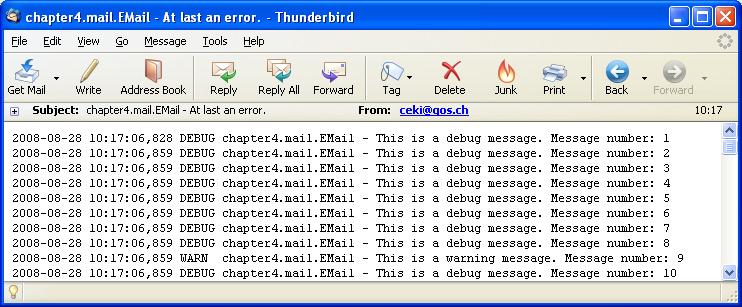
The recipient you specified should receive an email message
containing 100 logging events formatted by
PatternLayout The figure below is the resulting email
message as shown by Mozilla Thunderbird.
In the next example configuration file mail2.xml, the values for the smtpHost, to and from properties are determined by variable substitution. Here is the relevant part of mail2.xml.
<appender name="EMAIL" class="ch.qos.logback.classic.net.SMTPAppender">
  <smtpHost>${smtpHost}</smtpHost>
  <to>${to}</to>
  <from>${from}</from>
  <layout class="ch.qos.logback.classic.html.HTMLLayout"/>
</appender>
You can pass the required parameters on the command line:
java -Dfrom=source@xyz.com -Dto=recipient@xyz.com -DsmtpHost=some_smtp_host \ chapters.appenders.mail.EMail 10000 src/main/java/chapters/appenders/mail/mail2.xml
Be sure to replace with values as appropriate for your environment.
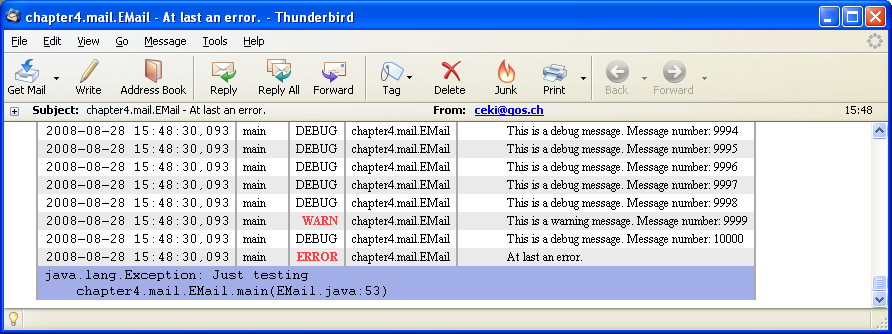
Note that in this latest example, PatternLayout
was replaced by HTMLLayout which formats logs as an
HTML table. You can change the list and order of columns as well
as the CSS of the table. Please refer to HTMLLayout documentation
for further details.
Given that the size of the cyclic buffer is 256, the recipient
should see an email message containing 256 events conveniently
formatted in an HTML table. Note that this run of the
chapters.appenders.mail.Email application generated
10'000 events of which only the last 256 were included in the
outgoing email.
Email clients such as Mozilla Thunderbird, Eudora or MS
Outlook, offer reasonably good CSS support for HTML email.
However, they sometimes automatically downgrade HTML to
plaintext. For example, to view HTML email in Thunderbird, the
"View→Message Body As→Original HTML" option
must be set. Yahoo! Mail's support for HTML email, in particular
its CSS support is very good. Gmail on the other hand, while it
honors the basic HTML table structure, ignores the internal CSS
formatting. Gmail supports inline CSS formatting but since inline
CSS would make the resulting output too voluminous,
HTMLLayout does not use inline CSS.
Custom buffer size
By default, the outgoing message will contain the last 256
messages seen by SMTPAppender. If your heart so
desires, you may set a different buffer size as shown in the next example.
Example: SMTPAppender configuration with a custom buffer size (logback-examples/src/main/resources/chapters/appenders/mail/customBufferSize.xml)
<configuration>
  <appender name="EMAIL" class="ch.qos.logback.classic.net.SMTPAppender">
    <smtpHost>${smtpHost}</smtpHost>
    <to>${to}</to>
    <from>${from}</from>
    <subject>%logger{20} - %m</subject>
    <layout class="ch.qos.logback.classic.html.HTMLLayout"/>

    <cyclicBufferTracker class="ch.qos.logback.core.spi.CyclicBufferTracker">
      <!-- send just one log entry per email -->
      <bufferSize>1</bufferSize>
    </cyclicBufferTracker>
  </appender>

  <root level="DEBUG">
    <appender-ref ref="EMAIL" />
  </root>
</configuration>
Requires a server call. Please wait a few seconds.
Requires a server call.
Triggering event
If the Evaluator property is not set, the
SMTPAppender defaults to an OnErrorEvaluator
instance which triggers email transmission when it encounters an
event of level ERROR. While triggering an outgoing email in
response to an error is relatively reasonable, it is possible to
override this default behavior by providing a different
implementation of the EventEvaluator interface.
The SMTPAppender submits each incoming event to
its evaluator by calling evaluate() method in order
to check whether the event should trigger an email or just be
placed in the cyclic buffer. When the evaluator gives a positive
answer to its evaluation, an email is sent out. The
SMTPAppender contains one and only one evaluator
object. This object may manage its own internal state. For
illustrative purposes, the CounterBasedEvaluator
class listed next implements an event evaluator whereby every
1024th event triggers an email message.
Example: A EventEvaluator
implementation that evaluates to true every 1024th
event (logback-examples/src/main/java/chapters/appenders/mail/CounterBasedEvaluator.java)
package chapters.appenders.mail;

import ch.qos.logback.core.boolex.EvaluationException;
import ch.qos.logback.core.boolex.EventEvaluator;
import ch.qos.logback.core.spi.ContextAwareBase;

public class CounterBasedEvaluator extends ContextAwareBase implements EventEvaluator {

  static int LIMIT = 1024;
  int counter = 0;
  String name;

  public boolean evaluate(Object event) throws NullPointerException,
      EvaluationException {
    counter++;

    if (counter == LIMIT) {
      counter = 0;

      return true;
    } else {
      return false;
    }
  }

  public String getName() {
    return name;
  }

  public void setName(String name) {
    this.name = name;
  }
}
Note that this class extends ContextAwareBase
and implements EventEvaluator. This allows the
user to concentrate on the core functions of her
EventEvaluator and let the base class provide the
common functionality.
Setting the Evaluator option of
SMTPAppender instructs it to use a custom evaluator.
The next configuration file attaches a SMTPAppender
to the root logger. This appender uses a
CounterBasedEvaluator instance as its event
evaluator.
Example: SMTPAppender with custom
Evaluator and buffer size (logback-examples/src/main/resources/chapters/appenders/mail/mail3.xml)
<configuration>
  <appender name="EMAIL" class="ch.qos.logback.classic.net.SMTPAppender">
    <evaluator class="chapters.appenders.mail.CounterBasedEvaluator" />
    <smtpHost>${smtpHost}</smtpHost>
    <to>${to}</to>
    <from>${from}</from>
    <subject>%logger{20} - %m</subject>

    <layout class="ch.qos.logback.classic.html.HTMLLayout"/>
  </appender>

  <root level="DEBUG">
    <appender-ref ref="EMAIL" />
  </root>
</configuration>
Requires a server call. Please wait a few seconds.
Requires a server call.
Marker based triggering
Although reasonable, the default triggering policy whereby every event of level ERROR triggers an outgoing email may result in too many emails, cluttering the targeted user's mailbox. Logback ships with another triggering policy, called OnMarkerEvaluator. It is based on markers. In essence, emails are triggered only if the event is marked with a user-specified marker. The next example should make the point clearer.
The Marked_EMail application contains several logging statements some of which are of level ERROR. One noteworthy statement contains a marker. Here is the relevant code.
Marker notifyAdmin = MarkerFactory.getMarker("NOTIFY_ADMIN");
logger.error(notifyAdmin,
  "This is a serious error requiring the admin's attention",
   new Exception("Just testing"));
The next configuration file will trigger outgoing emails only in presence of events bearing the NOTIFY_ADMIN or the TRANSACTION_FAILURE markers.
Example: SMTPAppender with
OnMarkerEvaluator (logback-examples/src/main/resources/chapters/appenders/mail/mailWithMarker.xml)
<configuration>
  <appender name="EMAIL" class="ch.qos.logback.classic.net.SMTPAppender">
    <evaluator class="ch.qos.logback.classic.boolex.OnMarkerEvaluator">
      <marker>NOTIFY_ADMIN</marker>
      <!-- you specify add as many markers as you want -->
      <marker>TRANSACTION_FAILURE</marker>
    </evaluator>
    <smtpHost>${smtpHost}</smtpHost>
    <to>${to}</to>
    <from>${from}</from>
    <layout class="ch.qos.logback.classic.html.HTMLLayout"/>
  </appender>

  <root>
    <level value ="debug"/>
    <appender-ref ref="EMAIL" />
  </root>
</configuration>
Requires a server call. Please wait a few seconds.
Requires a server call.
Give it a whirl with the following command:
java -Dfrom=source@xyz.com -Dto=recipient@xyz.com -DsmtpHost=some_smtp_host \ chapters.appenders.mail.Marked_EMail src/main/java/chapters/appenders/mail/mailWithMarker.xml
Marker-based triggering with JaninoEventEvaluator
Note that instead of using the marker-centric
OnMarkerEvaluator, we could use the much more generic
JaninoEventEvaluator.
For example, the following configuration file uses
JaninoEventEvaluator instead of
OnMarkerEvaluator but is otherwise equivalent to the
previous configuration file.
Example: SMTPAppender with
JaninoEventEvaluator (logback-examples/src/main/resources/chapters/appenders/mail/mailWithMarker_Janino.xml)
<configuration>
<appender name="EMAIL" class="ch.qos.logback.classic.net.SMTPAppender">
<evaluator class="ch.qos.logback.classic.boolex.JaninoEventEvaluator">
<expression>
(markerList.contains("NOTIFY_ADMIN") || marker.contains("TRANSACTION_FAILURE"))
</expression>
</evaluator>
<smtpHost>${smtpHost}</smtpHost>
<to>${to}</to>
<from>${from}</from>
<layout class="ch.qos.logback.classic.html.HTMLLayout"/>
</appender>
</configuration>Requires a server call. Please wait a few seconds.
Requires a server call.
Authentication/STARTTLS/SSL
SMTPAppender supports authentication via plain
user passwords as well as both the STARTTLS and SSL
protocols. Note that STARTTLS differs from SSL in that, in
STARTTLS, the connection is initially non-encrypted and only after
the STARTTLS command is issued by the client (if the server
supports it) does the connection switch to SSL. In SSL mode, the
connection is encrypted right from the start.
SMTPAppender configuration for Gmail (SSL)
The next example shows you how to configure
SMTPAppender for Gmail with the SSL protocol.
Example:: SMTPAppender to Gmail
using SSL
(logback-examples/src/main/resources/chapters/appenders/mail/gmailSSL.xml)
<configuration>
  <appender name="EMAIL" class="ch.qos.logback.classic.net.SMTPAppender">
    <smtpHost>smtp.gmail.com</smtpHost>
    <smtpPort>465</smtpPort>
    <SSL>true</SSL>
    <username>YOUR_USERNAME@gmail.com</username>
    <password>YOUR_GMAIL_PASSWORD</password>

    <to>EMAIL-DESTINATION</to>
    <to>ANOTHER_EMAIL_DESTINATION</to> <!-- additional destinations are possible -->
    <from>YOUR_USERNAME@gmail.com</from>
    <subject>TESTING: %logger{20} - %m</subject>
    <layout class="ch.qos.logback.classic.PatternLayout">
      <pattern>%date %-5level %logger{35} - %message%n</pattern>
    </layout>
  </appender>

  <root level="DEBUG">
    <appender-ref ref="EMAIL" />
  </root>
</configuration>
Requires a server call. Please wait a few seconds.
Requires a server call.
SMTPAppender for Gmail (STARTTLS)
The next example shows you how to configure
SMTPAppender for Gmail for the STARTTLS protocol.
Example: SMTPAppender to GMAIL using STARTTLS (logback-examples/src/main/resources/chapters/appenders/mail/gmailSTARTTLS.xml)
<configuration>
  <appender name="EMAIL" class="ch.qos.logback.classic.net.SMTPAppender">
    <smtpHost>smtp.gmail.com</smtpHost>
    <smtpPort>587</smtpPort>
    <STARTTLS>true</STARTTLS>
    <username>YOUR_USERNAME@gmail.com</username>
    <password>YOUR_GMAIL_xPASSWORD</password>

    <to>EMAIL-DESTINATION</to>
    <to>ANOTHER_EMAIL_DESTINATION</to> <!-- additional destinations are possible -->
    <from>YOUR_USERNAME@gmail.com</from>
    <subject>TESTING: %logger{20} - %m</subject>
    <layout class="ch.qos.logback.classic.PatternLayout">
      <pattern>%date %-5level %logger - %message%n</pattern>
    </layout>
  </appender>

  <root level="DEBUG">
    <appender-ref ref="EMAIL" />
  </root>
</configuration>
Requires a server call. Please wait a few seconds.
Requires a server call.
SMTPAppender with MDCDiscriminator
As mentioned earlier, by specifying a discriminator other than
the default one, SMTPAppender will generate email
messages containing events pertaining to a particular user, user
session or client IP address, depending on the specified discriminator.
The next example illustrates the use of MDCBasedDiscriminator in conjunction with the MDC key named "req.remoteHost", assumed to contain the IP address of the remote host accessing a fictitious application. In a web-application, you could use MDCInsertingServletFilter to populate MDC values.
Example: SMTPAppender with
MDCBasedDiscriminator
(logback-examples/src/main/resources/chapters/appenders/mail/mailWithMDCBasedDiscriminator.xml)
<configuration>
  <appender name="EMAIL" class="ch.qos.logback.classic.net.SMTPAppender">
    <smtpHost>ADDRESS-OF-YOUR-SMTP-HOST</smtpHost>
    <to>EMAIL-DESTINATION</to>
    <from>SENDER-EMAIL</from>

    <discriminator class="ch.qos.logback.classic.sift.MDCBasedDiscriminator">
      <key>req.remoteHost</key>
      <defaultValue>default</defaultValue>
    </discriminator>

    <subject>${HOSTNAME} -- %X{req.remoteHost} %msg"</subject>
    <layout class="ch.qos.logback.classic.html.HTMLLayout">
      <pattern>%date%level%thread%X{req.remoteHost}%X{req.requestURL}%logger%msg</pattern>
    </layout>
  </appender>

  <root>
    <level level="DEBUG"/>
    <appender-ref ref="EMAIL" />
  </root>
</configuration>
Requires a server call. Please wait a few seconds.
Requires a server call.
Thus, each outgoing email generated by
SMTPAppender will belong to a unique remote
host, greatly facilitating problem diagnosis.
Buffer management in very busy systems
Internally, each distinct value returned by the discriminator will cause the creation of a new cyclic buffer. However, at most maxNumberOfBuffers (by default 64) will be maintained. Whenever the number of buffers rises above maxNumberOfBuffers, the least recently updated buffer is automatically discarded. As a second safety measure, any buffer which has not been updated in the last 30 minutes will be automatically discarded as well.
On systems serving a large number of transactions per minute, allowing only a small number for maxNumberOfBuffers (by default 64) will often cause the number of events in the outgoing email to be unnecessarily small. Indeed, in the presence of a large number of transactions, there will be more than one buffer associated with the same transaction as buffers will be killed and re-born in succession for the same discriminator value (or transaction). Note that in even such very busy systems, the maximum number of cyclic buffers is capped by maxNumberOfBuffers.
To avoid such yo-yo effects, SMTPAppender will
release the buffer associated with a given discriminator key as
soon as it sees an event marked as "FINALIZE_SESSION". This will
cause the appropriate buffer to be discarded at the end of each
transaction. You can then safely increase the value of maxNumberOfBuffers to a larger value such as
512 or 1024 without risking running out of memory.
There are three distinct but complementary mechanisms working together to manage cyclic buffers. They ensure that only relevant buffers are kept alive at any given moment, even in very busy systems.
DBAppender
The DBAppender inserts logging events into three
database tables in a format independent of the Java programming
language.
As of logback version 1.2.8 DBAppender no longer
ships with logback-classic. However,
DBAppender for logback-classic is
available under the following Maven coordinates:
ch.qos.logback.db:logback-classic-db:1.2.11.1
These three tables are logging_event,
logging_event_property and
logging_event_exception. They must exist before
DBAppender can be used. Logback ships with SQL
scripts that will create the tables. They can be found under the
logback-classic/src/main/java/ch/qos/logback/classic/db/script
folder. There is a specific script for each of the most popular
database systems. If the script for your particular type of
database system is missing, it should be quite easy to write one,
taking example on the already existing scripts. If you send them
to us, we will gladly include missing scripts in future releases.
If your JDBC driver supports the getGeneratedKeys
method introduced in JDBC 3.0 specification, assuming you have
created the appropriate database tables as mentioned above, then
no additional steps are required. Otherwise, there must be an
SQLDialect appropriate for your database
system. Currently, logback has dialects for H2, HSQL, MS SQL
Server, MySQL, Oracle, PostgreSQL, SQLLite and Sybase.
The table below summarizes the database types and their support
of the getGeneratedKeys() method.
| RDBMS | tested version(s) | tested JDBC driver version(s) |
supports
getGeneratedKeys()
method
|
is a dialect provided by logback |
|---|---|---|---|---|
| DB2 | untested | untested | unknown | NO |
| H2 | 1.2.132 | - | unknown | YES |
| HSQL | 1.8.0.7 | - | NO | YES |
| Microsoft SQL Server | 2005 | 2.0.1008.2 (sqljdbc.jar) | YES | YES |
| MySQL | 5.0.22 | 5.0.8 (mysql-connector.jar) | YES | YES |
| PostgreSQL | 8.x | 8.4-701.jdbc4 | NO | YES |
| Oracle | 10g | 10.2.0.1 (ojdbc14.jar) | YES | YES |
| SQLLite | 3.7.4 | - | unknown | YES |
| Sybase SQLAnywhere | 10.0.1 | - | unknown | YES |
Experiments show that writing a single event into the database takes approximately 10 milliseconds, on a "standard" PC. If pooled connections are used, this figure drops to around 1 millisecond. Note that most JDBC drivers already ship with connection pooling support.
Configuring logback to use DBAppender can be done
in several different ways, depending on the tools one has to
connect to the database, and the database itself. The key issue in
configuring DBAppender is about setting its
ConnectionSource object, as we shall discover
shortly.
Once DBAppender is configured for your database,
logging events are sent to the specified database. As stated
previously, there are three tables used by logback to store
logging event data.
The logging_event table contains the following fields:
| Field | Type | Description |
|---|---|---|
| timestamp | big int |
The timestamp that was valid at the logging event's creation. |
| formatted_message | text |
The message that has been added to the logging event,
after formatting with
org.slf4j.impl.MessageFormatter, in case objects
were passed along with the message. |
| logger_name | varchar |
The name of the logger used to issue the logging request. |
| level_string | varchar |
The level of the logging event. |
| reference_flag | smallint |
This field is used by logback to identify logging events
that have an exception or Its value is computed by
|
| caller_filename | varchar |
The name of the file where the logging request was issued. |
| caller_class | varchar |
The class where the logging request was issued. |
| caller_method | varchar |
The name of the method where the logging request was issued. |
| caller_line | char |
The line number where the logging request was issued. |
| event_id | int |
The database id of the logging event. |
The logging_event_property is used to store the keys and values
contained in the MDC or the Context.
It contains these fields:
| Field | Type | Description |
|---|---|---|
| event_id | int |
The database id of the logging event. |
| mapped_key | varchar |
The key of the MDC property |
| mapped_value | text |
The value of the MDC property |
The logging_event_exception table contains the following fields:
| Field | Type | Description |
|---|---|---|
| event_id | int |
The database id of the logging event. |
| i | smallint |
The index of the line in the full stack trace. |
| trace_line | varchar |
The corresponding line |
To give a more visual example of the work done by DBAppender, here
is a screenshot of a MySQL database with content provided by DBAppender.
The logging_event table:

The logging_event_exception table:

The logging_event_property table:

ConnectionSource
The ConnectionSource interface provides a
pluggable means of transparently obtaining JDBC connections for
logback classes that require the use of a
java.sql.Connection. There are currently three
implementations of ConnectionSource, namely
DataSourceConnectionSource,
DriverManagerConnectionSource and
JNDIConnectionSource.
The first example that we will review is a configuration using
DriverManagerConnectionSource and a MySQL database.
The following configuration file is what one would need.
Example: DBAppender configuration (logback-examples/src/main/resources/chapters/appenders/db/append-toMySQL-with-driverManager.xml)
<configuration>

  <appender name="DB" class="ch.qos.logback.classic.db.DBAppender">
    <connectionSource class="ch.qos.logback.core.db.DriverManagerConnectionSource">
      <driverClass>com.mysql.jdbc.Driver</driverClass>
      <url>jdbc:mysql://host_name:3306/database_name</url>
      <user>username</user>
      <password>password</password>
    </connectionSource>
  </appender>

  <root level="DEBUG" >
    <appender-ref ref="DB" />
  </root>
</configuration>
Requires a server call. Please wait a few seconds.
Requires a server call.
The correct driver must be declared. Here, the
com.mysql.jdbc.Driver class is used. The url must begin with jdbc:mysql://.
The DriverManagerConnectionSource is an
implementation of ConnectionSource that obtains the
connection in the traditional JDBC manner based on the connection
URL.
Note that this class will establish a new
Connection for each call to
getConnection(). It is recommended that you either
use a JDBC driver that natively supports connection pooling or
that you create your own implementation of
ConnectionSource that taps into whatever pooling
mechanism you are already using. If you have access to a JNDI
implementation that supports javax.sql.DataSource,
e.g. within a J2EE application server, see JNDIConnectionSource
below.
Connecting to a database using a
DataSource is rather similar. The
configuration now uses
DataSourceConnectionSource, which is an
implementation of ConnectionSource that
obtains the Connection in the recommended
JDBC manner based on a
javax.sql.DataSource.
Example: DBAppender configuration (logback-examples/src/main/resources/chapters/appenders/db/append-with-datasource.xml)
<configuration  debug="true">

  <appender name="DB" class="ch.qos.logback.classic.db.DBAppender">
     <connectionSource class="ch.qos.logback.core.db.DataSourceConnectionSource">

       <dataSource class="${dataSourceClass}">
       	 <!-- Joran cannot substitute variables
       	 that are not attribute values. Therefore, we cannot
       	 declare the next parameter like the others.
       	 -->
         <param name="${url-key:-url}" value="${url_value}"/>
         <serverName>${serverName}</serverName>
         <databaseName>${databaseName}</databaseName>
       </dataSource>

       <user>${user}</user>
       <password>${password}</password>
     </connectionSource>
  </appender>

  <root level="INFO">
    <appender-ref ref="DB" />
  </root>
</configuration>
Requires a server call. Please wait a few seconds.
Requires a server call.
Note that in this configuration sample, we make heavy use of substitution variables. They are sometimes handy when connection details have to be centralized in a single configuration file and shared by logback and other frameworks.
JNDIConnectionSource
JNDIConnectionSource is another
ConnectionSource implementation shipping in logback.
As its name indicates, it retrieves a
javax.sql.DataSource from a JNDI and then leverages
it to obtain a java.sql.Connection
instance. JNDIConnectionSource is primarily designed
to be used inside J2EE application servers or by application
server clients, assuming the application server supports remote
access of javax.sql.DataSource. Thus, one can take
advantage of connection pooling and whatever other goodies the
application server provides. More importantly, your application
will be dryer
as it will be no longer necessary to define a
DataSource in logback.xml.
For example, here is a configuration snippet for Tomcat. It assumes PostgreSQL as the database although any of the supported database systems (listed above) would work.
<Context docBase="/path/to/app.war" path="/myapp">
  ...
  <Resource name="jdbc/logging"
               auth="Container"
               type="javax.sql.DataSource"
               username="..."
               password="..."
               driverClassName="org.postgresql.Driver"
               url="jdbc:postgresql://localhost/..."
               maxActive="8"
               maxIdle="4"/>
  ...
</Context>
Once a DataSource is defined in the J2EE server, it
can be easily referenced by your logback configuration file, as
shown in the next example.
Example: DBAppender configuration
by JNDIConnectionSource
(logback-examples/src/main/resources/chapters/appenders/db/append-via-jndi.xml)
<configuration debug="true">
  <appender name="DB" class="ch.qos.logback.classic.db.DBAppender">
    <connectionSource class="ch.qos.logback.core.db.JNDIConnectionSource">
      <!-- please note the "java:comp/env/" prefix -->
      <jndiLocation>java:comp/env/jdbc/logging</jndiLocation>
    </connectionSource>
  </appender>
  <root level="INFO">
    <appender-ref ref="DB" />
  </root>
</configuration>
Requires a server call. Please wait a few seconds.
Requires a server call.
Note that this class will obtain an
javax.naming.InitialContext
using the no-argument constructor. This will usually work
when executing within a J2EE environment. When outside the
J2EE environment, make sure that you provide a
jndi.properties
file as described by your JNDI provider's documentation.
Connection pooling
Logging events can be created at a rather fast pace. To keep up
with the flow of events that must be inserted into a database, it
is recommended to use connection pooling with
DBAppender.
Experiment shows that using connection pooling with DBAppender
gives a big performance boost. With the following
configuration file, logging events are sent to a MySQL database,
without any pooling.
Example: DBAppender configuration
without pooling
(logback-examples/src/main/resources/chapters/appenders/db/append-toMySQL-with-datasource.xml)
<configuration>

  <appender name="DB" class="ch.qos.logback.classic.db.DBAppender">
    <connectionSource class="ch.qos.logback.core.db.DataSourceConnectionSource">
      <dataSource class="com.mysql.jdbc.jdbc2.optional.MysqlDataSource">
        <serverName>${serverName}</serverName>
        <port>${port$</port>
        <databaseName>${dbName}</databaseName>
        <user>${user}</user>
        <password>${pass}</password>
      </dataSource>
    </connectionSource>
  </appender>

  <root level="DEBUG">
    <appender-ref ref="DB" />
  </root>
</configuration>
Requires a server call. Please wait a few seconds.
Requires a server call.
With this configuration file, sending 500 logging events to a MySQL database takes a whopping 5 seconds, that is 10 milliseconds per request. This figure is unacceptable when dealing with large applications.
A dedicated external library is necessary to use connection
pooling with DBAppender. The next example uses c3p0. To be able
to use c3p0, one must download it and place
c3p0-VERSION.jar in the classpath.
Example: DBAppender configuration
with pooling
(logback-examples/src/main/resources/chapters/appenders/db/append-toMySQL-with-datasource-and-pooling.xml)
<configuration>

  <appender name="DB" class="ch.qos.logback.classic.db.DBAppender">
    <connectionSource
      class="ch.qos.logback.core.db.DataSourceConnectionSource">
      <dataSource
        class="com.mchange.v2.c3p0.ComboPooledDataSource">
        <driverClass>com.mysql.jdbc.Driver</driverClass>
        <jdbcUrl>jdbc:mysql://${serverName}:${port}/${dbName}</jdbcUrl>
        <user>${user}</user>
        <password>${password}</password>
      </dataSource>
    </connectionSource>
  </appender>

  <root level="DEBUG">
    <appender-ref ref="DB" />
  </root>
</configuration>
Requires a server call. Please wait a few seconds.
Requires a server call.
With this new configuration, sending 500 logging requests to the aforementioned MySQL database takes around 0.5 seconds, for an average of 1 millisecond per request, that is a tenfold improvement in performance.
SyslogAppender
The syslog protocol is a very simple protocol: a syslog sender
sends a small message to a syslog receiver. The receiver is
commonly called syslog daemon or syslog server.
Logback can send messages to a remote syslog daemon. This is
achieved by using SyslogAppender.
Here are the properties you can pass to a SyslogAppender.
| Property Name | Type | Description |
|---|---|---|
| syslogHost | String |
The host name of the syslog server. |
| port | String |
The port number on the syslog server to connect to. Normally, one would not want to change the default value of 514. |
| facility | String |
The facility is meant to identify the source of a message. The facility option must be set to one of the strings KERN, USER, MAIL, DAEMON, AUTH, SYSLOG, LPR, NEWS, UUCP, CRON, AUTHPRIV, FTP, NTP, AUDIT, ALERT, CLOCK, LOCAL0, LOCAL1, LOCAL2, LOCAL3, LOCAL4, LOCAL5, LOCAL6, LOCAL7. Case is not important. |
| suffixPattern | String |
The suffixPattern option
specifies the format of the non-standardized part of the
message sent to the syslog server. By default, its value is
[%thread] %logger %msg. Any value that a
|
| stackTracePattern | String |
The stackTracePattern
property allows the customization of the string appearing just
before each stack trace line. The default value for this
property is "\t", i.e. the tab character. Any value accepted
by |
| throwableExcluded | boolean |
Setting throwableExcluded to
true will cause stack trace data associated with
a Throwable to be omitted. By default, throwableExcluded is set to
false so that stack trace data is sent to the
syslog server. |
The syslog severity of a logging event is converted from the level of the logging event. The DEBUG level is converted to 7, INFO is converted to 6, WARN is converted to 4 and ERROR is converted to 3.
Since the format of a syslog request follows rather strict
rules, there is no layout to be used with
SyslogAppender. However, using the suffixPattern option lets the user display
whatever information she wishes.
Here is a sample configuration using a
SyslogAppender.
Example: SyslogAppender
configuration
(logback-examples/src/main/resources/chapters/appenders/conf/logback-syslog.xml)
<configuration>

  <appender name="SYSLOG" class="ch.qos.logback.classic.net.SyslogAppender">
    <syslogHost>remote_home</syslogHost>
    <facility>AUTH</facility>
    <suffixPattern>[%thread] %logger %msg</suffixPattern>
  </appender>

  <root level="DEBUG">
    <appender-ref ref="SYSLOG" />
  </root>
</configuration>
Requires a server call. Please wait a few seconds.
Requires a server call.
When testing this configuration, you should verify that the remote syslog daemon accepts requests from an external source. Experience shows that, by default, syslog daemons usually deny requests coming via a network connection.