In symbols one observes an advantage in discovery which is greatest when they express the exact nature of a thing briefly and, as it were, picture it; then indeed the labor of thought is wonderfully diminished.
—GOTTFRIED WILHELM LEIBNIZ
Manual · Configuration · Configuration: XML syntax
Configuration: XML syntax
Configuration file syntax
As you have seen thus far in the manual with plenty of examples still to follow, logback allows you to redefine logging behavior without needing to recompile your code. Indeed, you can easily configure logback so as to disable logging for certain parts of your application, or direct output to a UNIX Syslog daemon, to a database, to a log visualizer, or forward logging events to a remote logback server, which would log according to local server policy, for example by forwarding the log event to a second logback server.
The remainder of this section presents the syntax of configuration files.
As will be demonstrated over and over, the syntax of logback
configuration files is extremely flexible. As such, it is not
possible to specify the allowed syntax with a DTD file or an XML
schema. Nevertheless, the very basic structure of the configuration
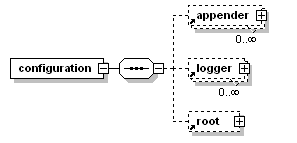
file can be described as, <configuration> element,
containing zero or more <appender> elements,
followed by zero or more <logger> elements,
followed by at most one <root> element. The
following diagram illustrates this basic structure.
If you are unsure which case to use for a given tag name, just follow the camelCase convention which is almost always the correct convention.
Case sensitivity of tag names
Since logback version 0.9.17, tag names pertaining to explicit
rules are case-insensitive. For example,
<logger>, <Logger> and
<LOGGER> are valid configuration elements and will
be interpreted in the same way. Note that XML well-formedness
rules still apply, if you open a tag as <xyz> you
must close it as </xyz>, </XyZ>
will not work. As for implicit
rules, tag names are case-sensitive except for the first
letter. Thus, <xyz> and <Xyz> are
equivalent but not <xYz>. Implicit rules usually
follow the camelCase
convention, common in the Java world. Since it is not easy to tell
when a tag is associated with an explicit action and when it is
associated with an implicit action, it is not trivial to say
whether an XML tag is case-sensitive or insensitive with respect
to the first letter. If you are unsure which case to use for a
given tag name, just follow the camelCase convention which is
almost always the correct convention.
Configuring loggers, or
the <logger> element
At this point you should have at least some understanding of level inheritance and the basic selection rule. Otherwise, and unless you are an egyptologist, logback configuration will be no more meaningful to you than are hieroglyphics.
A logger is configured using the logger element. A <logger> element takes exactly one mandatory name attribute, an optional level attribute, and an optional additivity attribute, admitting the values true or false. The value of the level attribute admitting one of the case-insensitive string values TRACE, DEBUG, INFO, WARN, ERROR, ALL or OFF. The special case-insensitive value INHERITED, or its synonym NULL, will force the level of the logger to be inherited from higher up in the hierarchy. This comes in handy if you set the level of a logger and later decide that it should inherit its level.
Note that unlike log4j, logback-classic does not close nor remove any previously referenced appenders when configuring a given logger.
The logger element may contain zero or more
<appender-ref> elements; each appender thus
referenced is added to the named logger. Note that unlike log4j,
logback-classic does not close nor remove any previously
referenced appenders when configuring a given logger.
Configuring the root
logger, or the <root> element
The <root> element configures the root
logger. It supports a single attribute, namely the level attribute. It does not allow any other
attributes because the additivity flag does not apply to the root
logger. Moreover, since the root logger is already named as
"ROOT", it does not allow a name attribute either. The value of the
level attribute can be one of the case-insensitive strings TRACE,
DEBUG, INFO, WARN, ERROR, ALL or OFF. Note that the level of the
root logger cannot be set to INHERITED or NULL.
Note that unlike log4j, logback-classic does not close nor remove any previously referenced appenders when configuring the root logger.
Similarly to the <logger> element, the
<root> element may contain zero or more
<appender-ref> elements; each appender thus
referenced is added to the root logger. Note that unlike log4j,
logback-classic does not close nor remove any previously
referenced appenders when configuring the root logger.
Example
Setting the level of a logger or root logger is as simple as declaring it and setting its level, as the next example illustrates. Suppose we are no longer interested in seeing any DEBUG messages from any component belonging to the "chapters.configuration" package. The following configuration file shows how to achieve that.
Example: Setting the level of a logger (logback-examples/src/main/resources/chapters/configuration/sample2.xml)
<configuration>

  <appender name="STDOUT" class="ch.qos.logback.core.ConsoleAppender">
    <!-- encoders are assigned the type
         ch.qos.logback.classic.encoder.PatternLayoutEncoder by default -->
    <encoder>
      <pattern>%d{HH:mm:ss.SSS} [%thread] %-5level %logger{36} -%kvp- %msg%n</pattern>
    </encoder>
  </appender>

  <logger name="chapters.configuration" level="INFO"/>

  <!-- Strictly speaking, the level attribute is not necessary since -->
  <!-- the level of the root level is set to DEBUG by default.       -->
  <root level="DEBUG">
    <appender-ref ref="STDOUT" />
  </root>

</configuration>
Requires a server call.
Requires a server call.
When the above configuration file is given as argument to the MyApp3 application, it will yield the following output:
17:34:07.578 [main] INFO  chapters.configuration.MyApp3 -- Entering application.
17:34:07.578 [main] INFO  chapters.configuration.MyApp3 -- Exiting application.
Note that the message of level DEBUG generated by the "chapters.configuration.Foo" logger has been suppressed. See also the Foo class.
You can configure the levels of as many loggers as you wish. In
the next configuration file, we set the level of the
chapters.configuration logger to INFO but at the same time set the level
of the chapters.configuration.Foo logger to DEBUG.
Example: Setting the level of multiple loggers (logback-examples/src/main/resources/chapters/configuration/sample3.xml)
<configuration>

  <appender name="STDOUT" class="ch.qos.logback.core.ConsoleAppender">
    <encoder>
      <pattern>
        %d{HH:mm:ss.SSS} [%thread] %-5level %logger{36} -%kvp- %msg%n
     </pattern>
    </encoder>
  </appender>

  <logger name="chapters.configuration" level="INFO" />
  <logger name="chapters.configuration.Foo" level="DEBUG" />

  <root level="DEBUG">
    <appender-ref ref="STDOUT" />
  </root>

</configuration>
Requires a server call.
Requires a server call.
Running MyApp3 with this configuration file will
result in the following output on the console:
17:39:27.593 [main] INFO  chapters.configuration.MyApp3 -- Entering application.
17:39:27.593 [main] DEBUG chapters.configuration.Foo -- Did it again!
17:39:27.593 [main] INFO  chapters.configuration.MyApp3 -- Exiting application.
The table below list the loggers and their levels, after
JoranConfigurator has configured logback with the
sample3.xml configuration file.
| Logger name | Assigned Level | Effective Level |
|---|---|---|
| root | DEBUG |
DEBUG |
| chapters.configuration | INFO |
INFO |
| chapters.configuration.MyApp3 | null |
INFO |
| chapters.configuration.Foo | DEBUG |
DEBUG |
It follows that the two logging statements of level
INFO in the MyApp3 class as well as the
DEBUG messages in Foo.doIt() are all enabled. Note that
the level of the root logger is always set to a non-null value,
DEBUG by default.
Let us note that the basic-selection rule depends on the effective level of the logger being invoked, not the level of the logger where appenders are attached. Logback will first determine whether a logging statement is enabled or not, and if enabled, it will invoke the appenders found in the logger hierarchy, regardless of their level. The configuration file sample4.xml is a case in point:
Example: Logger level sample (logback-examples/src/main/resources/chapters/configuration/sample4.xml)
<configuration>

  <appender name="STDOUT"
   class="ch.qos.logback.core.ConsoleAppender">
   <encoder>
     <pattern>
        %d{HH:mm:ss.SSS} [%thread] %-5level %logger{36} -%kvp- %msg%n
      </pattern>
    </encoder>
  </appender>

  <logger name="chapters.configuration" level="INFO" />

  <!-- turn OFF all logging (children can override) -->
  <root level="OFF">
    <appender-ref ref="STDOUT" />
  </root>

</configuration>
Requires a server call.
Requires a server call.
The following table lists the loggers and their levels after applying the sample4.xml configuration file.
| Logger name | Assigned Level | Effective Level |
|---|---|---|
| root | OFF |
OFF |
| chapters.configuration | INFO |
INFO |
| chapters.configuration.MyApp3 | null |
INFO |
| chapters.configuration.Foo | null |
INFO |
The ConsoleAppender named STDOUT, the only configured
appender in sample4.xml, is attached to the root logger
whose level is set to OFF. However, running
MyApp3 with configuration script sample4.xml will
yield:
17:52:23.609 [main] INFO chapters.configuration.MyApp3 - Entering application.
17:52:23.609 [main] INFO chapters.configuration.MyApp3 - Exiting application.
Thus, the level of the root logger has no apparent effect because
the loggers in chapters.configuration.MyApp3 and
chapters.configuration.Foo classes are all enabled for the
INFO level. As a side note, the chapters.configuration
logger exists by virtue of its declaration in the configuration file
- even if the Java source code does not directly refer to it.
Configuring Appenders
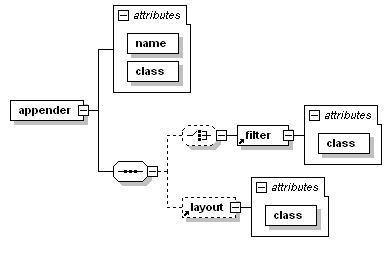
An appender is configured with the <appender>
element, which takes two mandatory attributes name and class. The
name attribute specifies the name of the
appender whereas the class attribute
specifies the fully qualified name of the appender class to
instantiate. The <appender> element may contain zero
or one <layout> elements, zero or more
<encoder> elements and zero or more
<filter> elements. Apart from these three common
elements, <appender> elements may contain any number
of elements corresponding to JavaBean properties of the appender
class. Seamlessly supporting any property of a given logback
component is one of the major strengths of Joran as discussed in a later chapter. The
following diagram illustrates the common structure. Note that
support for properties is not shown in the diagram below.
The <layout> element takes a mandatory class
attribute specifying the fully qualified name of the layout class to
instantiate. As with the <appender> element,
<layout> may contain other elements corresponding to
properties of the layout instance. Since it's such a common case, if
the layout class is PatternLayout, then the class
attribute can be omitted as specified by default class mapping
rules.
The <encoder> element takes a mandatory class
attribute specifying the fully qualified name of the encoder class
to instantiate. Since it's such a common case, if the encoder class
is PatternLayoutEncoder, then the class attribute can
be omitted as specified by default class mapping
rules.
Logging to multiple appenders is as easy as defining the various appenders and referencing them in a logger, as the next configuration file illustrates:
Example: Multiple loggers (logback-examples/src/main/resources/chapters/configuration/multiple.xml)
<configuration>

  <appender name="FILE" class="ch.qos.logback.core.FileAppender">
    <file>myApp.log</file>

    <encoder>
      <pattern>%date %level [%thread] %logger{10} [%file:%line] -%kvp- %msg%n</pattern>
    </encoder>
  </appender>

  <appender name="STDOUT" class="ch.qos.logback.core.ConsoleAppender">
    <encoder>
      <pattern>%kvp %msg%n</pattern>
    </encoder>
  </appender>

  <root level="debug">
    <appender-ref ref="FILE" />
    <appender-ref ref="STDOUT" />
  </root>
</configuration>
Requires a server call.
Requires a server call.
These configuration scripts define two appenders called
FILE and STDOUT. The FILE appender logs
to a file called myApp.log. The encoder for this appender
is a PatternLayoutEncoder that outputs the date, level,
thread name, logger name, file name and line number where the log
request is located, the message and line separator character(s).
The second appender called STDOUT outputs to the
console. The encoder for this appender outputs only the message
string followed by a line separator.
The appenders are attached to the root logger by referencing them by name within an appender-ref element. Note that each appender has its own encoder. Encoders are usually not designed to be shared by multiple appenders. The same is true for layouts. As such, logback configuration files do not provide any syntactical means for sharing encoders or layouts.
Appenders accumulate
By default, appenders are cumulative: a logger will log to the appenders attached to itself (if any) as well as all the appenders attached to its ancestors. Thus, attaching the same appender to multiple loggers will cause logging output to be duplicated.
Example: Duplicate appender (logback-examples/src/main/resources/chapters/configuration/duplicate.xml)
<configuration>

  <appender name="STDOUT" class="ch.qos.logback.core.ConsoleAppender">
    <encoder>
      <pattern>%d{HH:mm:ss.SSS} [%thread] %-5level %logger{36} -%kvp- %msg%n</pattern>
    </encoder>
  </appender>

  <logger name="chapters.configuration">
    <appender-ref ref="STDOUT" />
  </logger>

  <root level="debug">
    <appender-ref ref="STDOUT" />
  </root>
</configuration>
Requires a server call.
Requires a server call.
Running MyApp3 with duplicate.xml will
yield the following output:
14:25:36.343 [main] INFO chapters.configuration.MyApp3 -- Entering application. 14:25:36.343 [main] INFO chapters.configuration.MyApp3 -- Entering application. 14:25:36.359 [main] DEBUG chapters.configuration.Foo -- Did it again! 14:25:36.359 [main] DEBUG chapters.configuration.Foo -- Did it again! 14:25:36.359 [main] INFO chapters.configuration.MyApp3 -- Exiting application. 14:25:36.359 [main] INFO chapters.configuration.MyApp3 -- Exiting application.
Notice the duplicated output. The appender named STDOUT is attached to two loggers, to root and to chapters.configuration. Since the root logger is the ancestor of all loggers and chapters.configuration is the parent of both chapters.configuration.MyApp3 and chapters.configuration.Foo, each logging request made with these two loggers will be output twice, once because STDOUT is attached to chapters.configuration and once because it is attached to root.
Appender additivity is not intended as a trap for new users. It is quite a convenient logback feature. For instance, you can configure logging such that log messages appear on the console (for all loggers in the system) while messages only from some specific set of loggers flow into a specific appender.
Example: Multiple appender (logback-examples/src/main/resources/chapters/configuration/restricted.xml)
<configuration>

  <appender name="FILE" class="ch.qos.logback.core.FileAppender">
    <file>myApp.log</file>
    <encoder>
      <pattern>%date %level [%thread] %logger{10} [%file:%line] -%kvp- %msg%n</pattern>
    </encoder>
  </appender>

  <appender name="STDOUT" class="ch.qos.logback.core.ConsoleAppender">
    <encoder>
      <pattern>%kvp %msg%n</pattern>
    </encoder>
  </appender>

  <logger name="chapters.configuration">
    <appender-ref ref="FILE" />
  </logger>

  <root level="debug">
    <appender-ref ref="STDOUT" />
  </root>
</configuration>
Requires a server call.
Requires a server call.
In this example, the console appender will log all the messages (for all loggers in the system) whereas only logging requests originating from the chapters.configuration logger and its children will go into the myApp.log file.
Overriding the default cumulative behaviour
In case the default cumulative behavior turns out to be unsuitable for your needs, you can override it by setting the additivity flag to false. Thus, a branch in your logger tree may direct output to a set of appenders different from those of the rest of the tree.
Example: Additivity flag (logback-examples/src/main/resources/chapters/configuration/additivityFlag.xml)
<configuration>

  <appender name="FILE" class="ch.qos.logback.core.FileAppender">
    <file>foo.log</file>
    <encoder>
      <pattern>%date %level [%thread] %logger{10} [%file : %line] -%kvp- %msg%n</pattern>
    </encoder>
  </appender>

  <appender name="STDOUT" class="ch.qos.logback.core.ConsoleAppender">
    <encoder>
      <pattern>%msg%n</pattern>
    </encoder>
  </appender>

  <logger name="chapters.configuration.Foo" additivity="false">
    <appender-ref ref="FILE" />
  </logger>

  <root level="debug">
    <appender-ref ref="STDOUT" />
  </root>
</configuration>
Requires a server call.
Requires a server call.
This example, the appender named FILE is attached to the
chapters.configuration.Foo logger. Moreover, the chapters.configuration.Foo
logger has its additivity flag set to false such that its logging
output will be sent to the appender named FILE but not to
any appender attached higher in the hierarchy. Other loggers remain
oblivious to the additivity setting of the chapters.configuration.Foo
logger. Running the MyApp3 application with the
additivityFlag.xml configuration file will output results
on the console from the chapters.configuration.MyApp3 logger. However,
output from the chapters.configuration.Foo logger will appear in the
foo.log file and only in that file.
Setting the context name
As mentioned in an
earlier chapter, every logger is attached to a logger
context. By default, the logger context is called
"default". However, you can set a different name with the help of
the <contextName> configuration directive. Note that
once set, the logger context name cannot
be changed. Setting the context name is a simple and
straightforward method in order to distinguish between multiple
applications logging to the same target.
Example: Set the context name and display it (logback-examples/src/main/resources/chapters/configuration/contextName.xml)
<configuration>
  <contextName>myAppName</contextName>
  <appender name="STDOUT" class="ch.qos.logback.core.ConsoleAppender">
    <encoder>
      <pattern>%d %contextName [%t] %level %logger{36} -%kvp- %msg%n</pattern>
    </encoder>
  </appender>

  <root level="debug">
    <appender-ref ref="STDOUT" />
  </root>
</configuration>
Requires a server call.
Requires a server call.
This last example illustrates naming of the logger context. Adding the contextName conversion word in layout's pattern will output the said name.