There is so much to tell about the Western country in that day that it is hard to know where to start. One thing sets off a hundred others. The problem is to decide which one to tell first.
—JOHN STEINBECK, East of Eden
Appenders
What is an Appender?
Logback delegates the task of writing a logging event to
components called appenders. Appenders must implement
the ch.qos.logback.core.Appender
interface. The salient methods of this interface are summarized
below:
Most of the methods in the Appender interface are
setters and getters. A notable exception is the
doAppend() method taking an object instance of type
E as its only parameter. The actual type of E
will vary depending on the logback module. Within the
logback-classic module E would be of type ILoggingEvent
and within the logback-access module it would be of type AccessEvent.
The doAppend() method is perhaps the most important in
the logback framework. It is responsible for outputting the logging
events in a suitable format to the appropriate output device.
Appenders are named entities. This ensures that they can be
referenced by name, a quality confirmed to be instrumental in
configuration scripts. The Appender interface extends
the FilterAttachable interface. It follows that one or
more filters can be attached to an appender instance. Filters are
discussed in detail in a subsequent chapter.
Appenders are ultimately responsible for outputting logging
events. However, they may delegate the actual formatting of the
event to a Layout or to an Encoder object.
Each layout/encoder is associated with one and only one appender,
referred to as the owning appender. Some appenders have a built-in
or fixed event format. Consequently, they do not require nor have a
layout/encoder. For example, the SocketAppender simply
serializes logging events before transmitting them over the wire.
AppenderBase
The
ch.qos.logback.core.AppenderBase class is an
abstract class implementing the Appender interface. It
provides basic functionality shared by all appenders, such as
methods for getting or setting their name, their activation status,
their layout and their filters. It is the super-class of all
appenders shipped with logback. Although an abstract class,
AppenderBase actually implements the
doAppend() method in the Append interface.
Perhaps the clearest way to discuss AppenderBase class
is by presenting an excerpt of actual source code.
public synchronized void doAppend(E eventObject) {
// prevent re-entry.
if (guard) {
return;
}
try {
guard = true;
if (!this.started) {
if (statusRepeatCount++ < ALLOWED_REPEATS) {
addStatus(new WarnStatus(
"Attempted to append to non started appender [" + name + "].",this));
}
return;
}
if (getFilterChainDecision(eventObject) == FilterReply.DENY) {
return;
}
// ok, we now invoke the derived class's implementation of append
this.append(eventObject);
} finally {
guard = false;
}
}This implementation of the doAppend() method is
synchronized. It follows that logging to the same appender from
different threads is safe. While a thread, say T, is
executing the doAppend() method, subsequent calls by
other threads are queued until T leaves the
doAppend() method, ensuring T's exclusive
access to the appender.
Since such synchronization is not always appropriate, logback
ships with ch.qos.logback.core.UnsynchronizedAppenderBase
which is very similar to the AppenderBase
class. For the sake of conciseness, we will be discussing
UnsynchronizedAppenderBase in the remainder of this document.
The first thing the doAppend() method does is to
check whether the guard is set to true. If it is, it immediately
exits. If the guard is not set, it is set to true at the next
statement. The guard ensures that the doAppend() method
will not recursively call itself. Just imagine that a component,
called somewhere beyond the append() method, wants to
log something. Its call could be directed to the very same appender
that just called it resulting in an infinite loop and a stack
overflow.
In the following statement we check whether the
started field is true. If it is not,
doAppend() will send a warning message and return. In
other words, once an appender is closed, it is impossible to write
to it. Appender objects implement the
LifeCycle interface, which implies that they implement
start(), stop() and
isStarted() methods. After setting all the properties of
an appender, Joran, logback's configuration framework, calls the
start() method to signal the appender to activate its
properties. Depending on its kind, an appender may fail to start if
certain properties are missing or because of interference between
various properties. For example, given that file creation depends on
truncation mode, FileAppender cannot act on the value
of its File option until the value of the Append option
is also known with certainty. The explicit activation step ensures
that an appender acts on its properties after their values
become known.
If the appender could not be started or if it has been stopped, a
warning message will be issued through logback's internal status
management system. After several attempts, in order to avoid
flooding the internal status system with copies of the same warning
message, the doAppend() method will stop issuing these
warnings.
The next if statement checks the result of the
attached filters. Depending on the decision resulting from the
filter chain, events can be denied or explicitly accepted. In
the absence of a decision by the filter chain, events are accepted
by default.
The doAppend() method then invokes the derived
classes' implementation of the append() method. This
method does the actual work of appending the event to the
appropriate device.
Finally, the guard is released so as to allow a subsequent
invocation of the doAppend() method.
For the remainder of this manual, we reserve the term "option" or alternatively "property" for any attribute that is inferred dynamically using JavaBeans introspection through setter and getter methods.
Logback-core
Logback-core lays the foundation upon which the other logback modules are built. In general, the components in logback-core require some, albeit minimal, customization. However, in the next few sections, we describe several appenders which are ready for use out of the box.
OutputStreamAppender
OutputStreamAppender
appends events to a java.io.OutputStream. This class
provides basic services that other appenders build upon. Users do
not usually instantiate OutputStreamAppender objects
directly, since in general the java.io.OutputStream
type cannot be conveniently mapped to a string, as there is no way
to specify the target OutputStream object in a
configuration script. Simply put, you cannot configure a
OutputStreamAppender from a configuration file.
However, this does not mean that OutputStreamAppender
lacks configurable properties. These properties are described next.
| Property Name | Type | Description |
|---|---|---|
| encoder | Encoder |
Determines the manner in which an event is written to the
underlying OutputStreamAppender. Encoders are
described in a dedicated chapter.
|
| immediateFlush | boolean |
The default value for immediateFlush is 'true'. Immediate flushing of the output stream ensures that logging events are immediately written out and will not be lost in case your application exits without properly closing appenders. On the other hand, setting this property to 'false' is likely to quadruple (your mileage may vary) logging throughput. Again, if immediateFlush is set to 'false' and if appenders are not closed properly when your application exits, then logging events not yet written to disk may be lost. |
The OutputStreamAppender is the super-class of three other
appenders, namely ConsoleAppender,
FileAppender which in turn is the super class of
RollingFileAppender. The next figure illustrates the
class diagram for OutputStreamAppender and its subclasses.
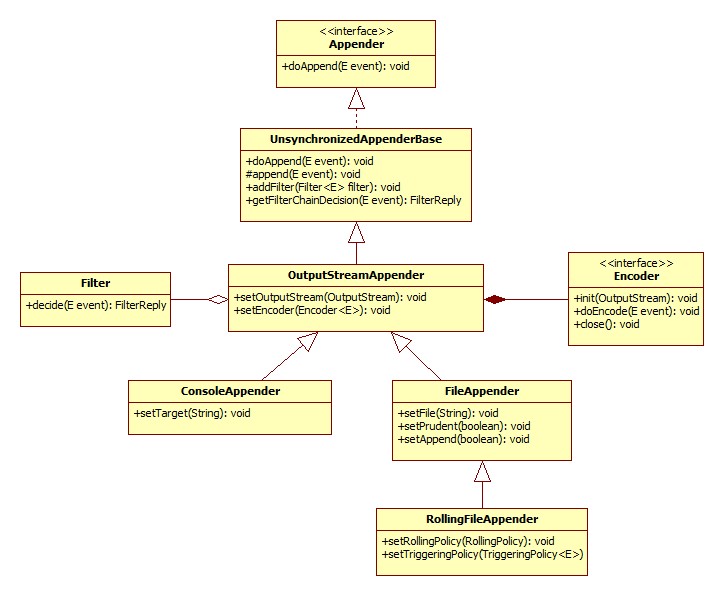
Appenders in this manual
With the shared foundation above in place, the remaining appenders are described on focused pages:
Console and File — continues with ConsoleAppender, JansiConsoleAppender, FileAppender
Rolling file — RollingFileAppender, rolling and triggering policies
Network and mail — Socket/SSL, SMTP, DB, Syslog appenders; SimpleSocketServer
Async and sifting — AsyncAppender and SiftingAppender
Using SSL — certificates and SSL configuration for network components
For the full historical single-page version of this chapter, see the individual sections above (content was split from one large page without changing embedded configuration samples).